Additional Ardupilot Setup
DISCLAIMER: This information has been largely copied from the mLRS Official Documentation. Please refer here for the most up-to-date information.
CRSF Receiver
Ardupilot and CRSF Receivers can have some issues getting setup. In general, use CRSF receivers with ports that have Direct Memory Access (DMA) enabled (Only applicable with F4/F7 flight controllers).
The serial ports that have DMA enabled can be found by using the MAVProxy command ftp get @SYS/uarts.txt -, an ‘*’ will denote serial ports that have DMA enabled (example for Matek F405 VTOL):
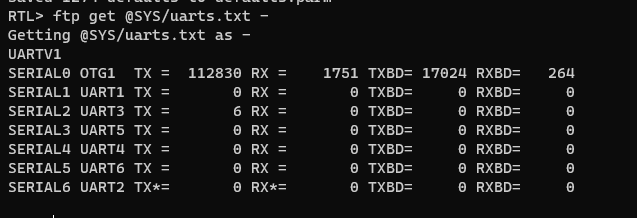
If a serial port without DMA is useed, Mission Planner will show the message CRSF: running on non-DMA serial port in the Messages section.
For a Matek H743 board the configuration is (example):
BRD_ALT_CONFIG = 1
RC_PROTOCOLS = 536 or 512
RSSI_TYPE = 3 or 5
SERIAL7_BAUD = irrelevant (baud rate is determined by ArduPilot)
SERIAL7_OPTIONS = 0
SERIAL7_PROTOCOL = 23
Additional References:
Received Signal Strength Indicator (RSSI)
RSSI generally is a value of how faint of the RF signal received is. While it’s a useful metric to determine how much range is left in a system, it should NOT be used as the only metric to determine the radio system status. High RSSI value means aircraft is closer. Low RSSI value means aircraft is further.
A high RSSI value DOES NOT neecessarily mean that you have a lot of range left in the radio system.
There are often other more complex factors that go into an RF system, such as noise floor, multi-pathing, EMI, chipset-specific quirks, etc which all may ultimately cause a link drop even when RSSI is not at its minimum value yet.
Ardupilot converts RSSI to a range between [0.0, 1.0]. 0.0 meaning the weakest/farthes signal and 1.0 means strongest/closes signal.
The equation used in the scaling is dependent on the RSSI source:
RSSI_TYPE = 3(ReceiverProtocol): mLRS sends RSSI in dBm to CRSF telemetry. ArduPilot applies scaling using the formula:RSSI = 1 - ((RSSI_dBM - 50) / 70). This means that -120 dBm is mapped to 0.0 and -50 dBm to 1.0. Note: When usingRSSI_TYPE = 3, it is possible to replace the RSSI with LQ using theRC_OPTIONSbitmask.RSSI_TYPE = 5(TelemetryRadioRSSI): mLRS sends RSSI in MAVLink stream to ArduPilot viaRADIO_STATUSmessage, in MAVLink units. mLRS applies the scalingRSSI = (1 - ((RSSI_dBM - 50) / 70))*254to convert to MAVLink units (i.e. -120 dBm is mapped to 0 and -50 dBm to 254). This is enabled in mLRS when the parameterRx Snd RadioStatis notoff.RSSI_TYPE = 2: (RCChannelPwmValue): mLRS can be configured to send RSSI (and LQ) as a channel value to ArduPilot. This option is not recommended and not further described.
A Ground Control Station (GCS) software such as MissionPlanner gets receiver RSSI data from ArduPilot via MAVLink messages (usually via the RC_CHANNELS message) in MAVLink units. This value is available in MissionPlanner as rxrssi.
In addition to the above, a Tx module may send RADIO_STATUS MAVLink messages to the GCS, with RSSI in MAVLink units. The data from the Tx module is available in MissionPlanner as rssi and remrssi (also noise and remnoise are available).
This is enabled in mLRS when the parameter Tx Snd RadioStat is set to 1 Hz. The mLRS Tx module will use the following formula to convert from RSSI in dBm to MAVLink units: RSSI = (1 - ((RSSI_dBM - 50) / 70)) * 254.
In Mission Planner, three RSSI metrics are thus aavailable with mLRS (all in MAVLink units):
rxrssi- the RSSI of the mLRS receiver, as seen by ArduPilot (and passed back to the ground viaRC_CHANNELSmessages)rssi- the RSSI of the mLRS Tx moduleremrssi- the RSSI of the mLRS receiver, as seen by the mLRS Tx module (passed back to the ground within the mLRS OTA packet). Note: In theory, this value should match therxrssivalue however due to scaling and timing this is not guaranteed.
Additional References:
RSSI Comparison Chart
It is often useful to know the exact RSSI dBm as opposed to RSSI as a percentage or in MAVLink units. The RSSI dBm allows one to understand exactly how much margin there is in the link budget. The table below provides conversions to RSSI dBm:
| RSSI dBm | RSSI % | RSSI MAVLink units | Notes |
|---|---|---|---|
| -90 | 43 | 77 | |
| -100 | 29 | 73 | |
| -105 | 21 | 55 | 50 Hz Mode receiver sensitivity |
| -108 | 17 | 44 | 31 Hz Mode receiver sensitivity |
| -112 | 11 | 29 | 19 Hz Mode receiver sensitivity |
NOTE: The receiver sensitivity varies with the mLRS mode. The listed sensitivity limits assume that the RF stage does not include a LNA.
Stream Rates
When configuring SRy/MAVy parameters, ‘y’ does usually not correspond to the number ‘x’ of the SERIALx port but to the count of serial ports using the MAVLink protocol. SERIAL0, and thus SR0, is nearly always reserved for the USB connection and set to use the MAVLink protocol (not possible in ArduPilot 4.7, has no MAV0). Therefore, as an example, in a setup where SERIAL1 and SERIAL2 are not set to MAVLink protocol and with the mLRS receiver connected to SERIAL3, then SR1/MAV1 configures the stream rates for the mLRS receiver.
To understand how stream rates affect the MAVLink data rate, you can use this calculator (requires Python).
Flow Control
The mLRS receiver implements software flow control between itself and the flight controller, when configured as follows:
Rx Snd RadioStat=ardu_1: optimizes for ArduPilot usageRx Snd RadioStat=meth_b: optimizes for PX4 usage
NOTE: It is highly recommended to have this option enabled, i.e., have Rx Snd RadioStat configured to one of these two settings.
MAVLink RC
RC data and link quality data can be provided to ArduPilot in several ways, for instance via a CRSF connection. It is also possible to send these data via the MAVLink serial port, which can make the etxra RC wire unneccessary.
Two options are available, which can be enabled via the “Rx Snd RcChannel” parameter:
Rx Snd RcChannel=rc_channel_overrides: outputs MAVLinkRC_CHANNELS_OVERRIDEmessagesRx Snd RcChannel=radio_rc_channels: outputs the newer MAVLinkRADIO_RC_CHANNELSmessages
NOTE: Using radio_rc_channels requires ArduPilot v4.6.0 or later. Supported by 2 MB flash boards as standard; boards with smaller flash may enable the feature by creating a custom firmware version with the option for MAVLink under RC being selected in the firmware configurator. RC_PROTOCOL parameter must have bit 17 enabled (MAVRadio).
NOTE: With both options the link statistics data reported to ArduPilot is reduced as compared to CRSF (only RSSI or LQ is available).
For more details, please visit the mLRS Official Documentation.