DroneCAN
The NOVALINK Receiver has native DroneCAN support for both standard CAN and FD-CAN.
Setup
The wiring diagram is shown below. It is a 4-pin JST-GH connector.
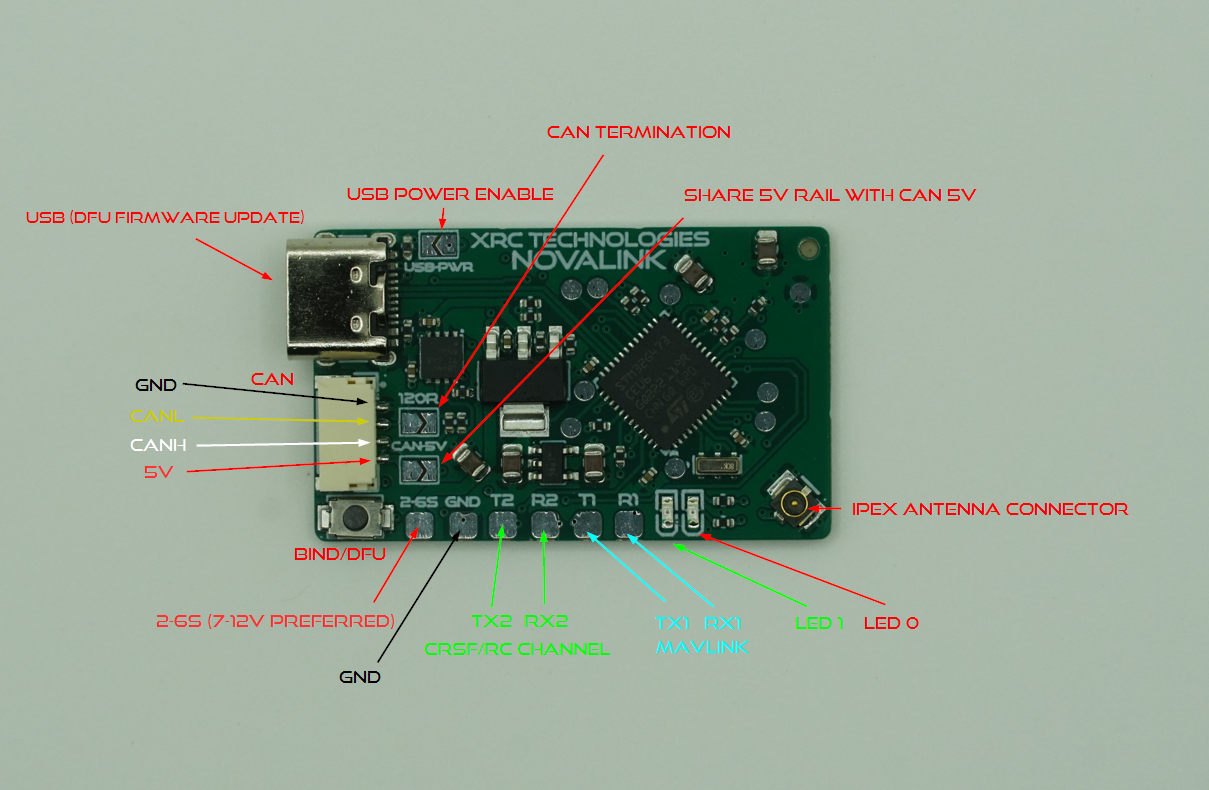
| Pin | Function |
| 1 | 5V |
| 2 | CAN-H |
| 3 | CAN-L |
| 4 | GND |
There is an onboard 120 ohm termination resistor between the CANH and CANL lines. To activate, bridge the 120R solder jumper next to the CAN connector.
Additionally, there is an option to bridge the 5V internal supply of the Receiver with the CAN 5V line.
CRITICAL: To avoid potential damage to the flight controller, Receiver, or both, only provide one source of 5V power to/from the Receiver. Either power the receiver via the 2-6s pads and use the 5V to power the flight controller (output current 1A MAX), or use the flight controller’s 5V power to supply the Receiver (DO NOT provide any external power to the Receiver).
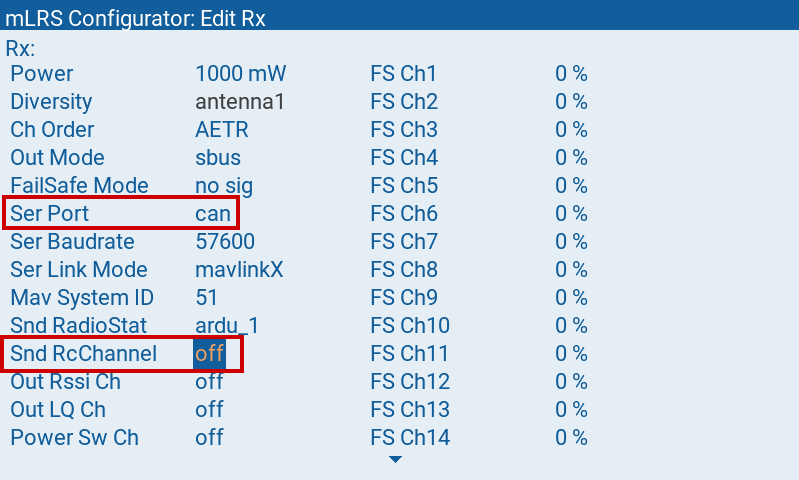
Configure the Receiver as follows:
Ser Port=canorcanfdSndRcChannel=off(Important)
NOTE: When connecting the CAN wires, it is recommended to use twisted pair wires for better signal integrity.
Ardupilot Configuration
CAN_D1_PROTOCOL = 1
CAN_P1_DRIVER = 1
CAN_D1_UC_SER_EN = 1 (only needed when MAVLink via DroneCAN is desired)
CAN_D1_UC_OPTION: for CANFD, enable the bit “EnableCanfd”
RC_PROTOCOLS should have DroneCAN bit enabled.
CAN_D1_UC_S1_BD = 57 (57600)
CAN_D1_UC_S1_IDX = 0 (Serial 0)
CAN_D1_UC_S1_NOD = 68
CAN_D1_UC_S1_PRO = 2 (MAVLink 2)
NOTE: The setting Serial 0 should not be confused with ArduPilot’s SERIALx parameters or mLRS’ serial and serial2 ports.
Optional: CAN_D1_UC_NTF_RT = 10 (Adjust DroneCAN stream rates)
When configuring MAVy/SRy parameters for DroneCAN, y corresponds to the number of serial ports that you have enabled for MAVLink (SERIALx parameters). For example, if you are using SERIAL0 for USB and SERIAL2 for MAVLink then you will have to modify the MAV3/SR2 parameters for the DroneCAN connection:
SERIAL0 will use MAV1/SR0 SERIAL2 will use MAV2/SR1 DroneCAN will use MAV3/SR2
NOTE: It may be necessary to reboot the flight controller after changing CAN_P1_DRIVER to edit CAN_D1_UC_SER_EN.
NOTE: mLRS requires CAN_P1_BITRATE = 1000000 and, if you want to use CANFD, CAN_P1_FDBITRATE = 4. However, these are the default values of ArduPilot, so that you normally don’t need to adjust these parameters.
NOTE: For CANFD to work properly, ensure that your flight controller hardware supports it. Not all flight controllers support this. Disconnect Receiver from CAN-bus to update firmware via USB.
Supported DroneCAN Services
protocol.dynamic_node_id.Allocation
Limitations
All Versions of ArduPilot
In MissionPlanner, on the DroneCAN/UAVCAN page, communication with the CAN nodes is not possible when connected via the mLRS link (mLRS has code to prevent this, as there is a critical bug in some ArduPilot versions which would lead to a crash of ArduPilot). This works normally when the flight controller is connected to MissionPlanner via e.g. USB.
CRSF or SBus cannot be used in combination with DroneCAN RC.
The MAVLink stream rates must not be set to too high values as this can lead to lost messages.
ArduPilot 4.6.x
DroneCAN RC only provides RSSI and not LQ or SNR.
OSD is limited to RSSI.
ArduPilot 4.5.x
- The baudrate of the DroneCAN virtual serial port (“CAN_D1_UC_S1_BD” parameter) should be set to 57600; otherwise the MAVLink flow control will not work properly.
For more details, please visit the mLRS Official Documentation.