Logging
There are many ways to log flight data. One convenient option will be presented in this guide, but please refer to the mLRS Official Documentation for additional Logging options.
There is an excellent guide by OscarLiang avaiable for further info.
Setup (TX16s Example)
In EdgeTX, navigate to Model -> Special Functions.
Add a special function called SD Logs and set it to a switch.
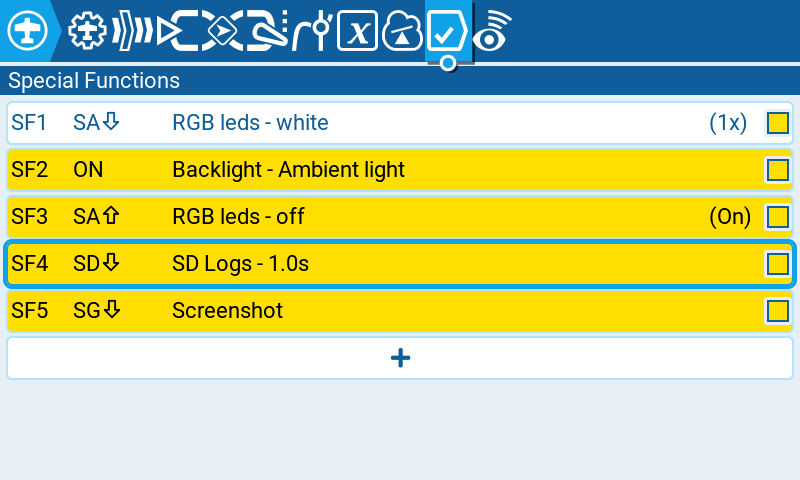
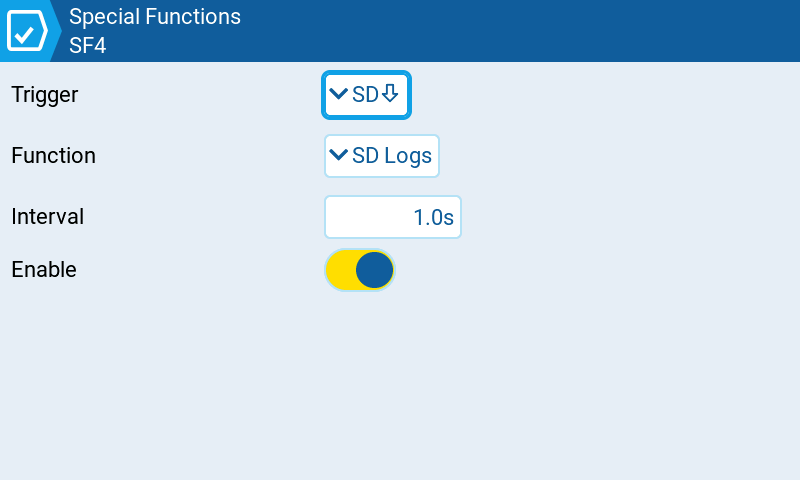
Enable this setting and set the Interval value to 1.0
Telemetry will be recorded every 1 second. This parameter may be changed but please note that for long flights, this will consume much data.
Now simply activate the switch and the radio controller will start logging telemetry data.
The data will be saved as a .csv file under LOGS in the radio controller’s filesystem.
This data may be processed a number of ways with Python, Excel, Libreoffice Calc, or any other data analytics software.
A good online option may be found HERE